> For the complete documentation index, see [llms.txt](https://docs.wepin.io/llms.txt). Markdown versions of documentation pages are available by appending `.md` to page URLs; this page is available as [Markdown](https://docs.wepin.io/en/deprecated/unity-sdk/installation.md).
# Installation
## Installation
Here is how to install the Wepin Unity SDK.
### Download it from Github.
The Wepin Unity SDK is distributed on the [wepin-unity-sdk Github](https://github.com/WepinWallet/wepin-unity-sdk). Download the `wepinSDK_vX.X.X.unitypackage` file and import the package file into your Unity3D project.
If you encounter the following error when importing this package,
```
The type or namespace name 'Newtonsoft' could not be found (are you missing a using directive or an assembly reference?)
```
Please add dependency "com.unity.nuget.newtonsoft-json": "3.0.2" Packages/manifest.json file in the project root.
## For iOS
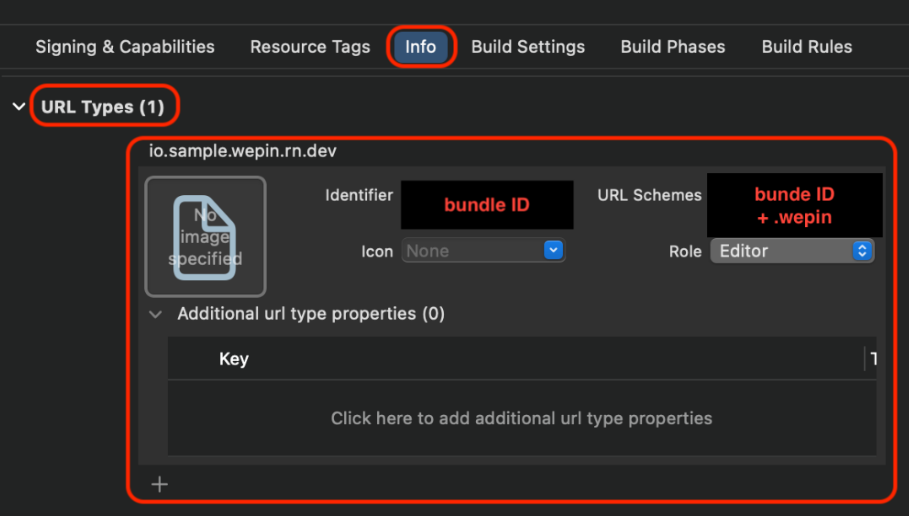
### Modify Info file
In Xcode, you need to register URL Schemes in the Info file.
The value of URL Schemes should be your `App Bundle ID + .wepin`.
## For Android
### Modify AndroidManifest
To use Wepin in your app, you need to modify the AndroidManifest.xml file of your app.
#### Add Permissions
Add the following permission to the main Activity of your app to use Wepin.
```xml
```
#### Add Intent Filter for Wepin Activity
You need to add an intent filter for the Wepin activity in your app's AndroidManifest.xml. The schema value you add should be `your app's package name + .wepin`.
```xml
....
```
## Release
The released package versions can be found on the GitHub repository below.
{% embed url="" %}